 Easy Shabad Finder
Say the line. Find the Shabad.
Sometimes a line is in your head but not on your fingertips. Tap the microphone, say what you remember, and let the app do the spelling for you.
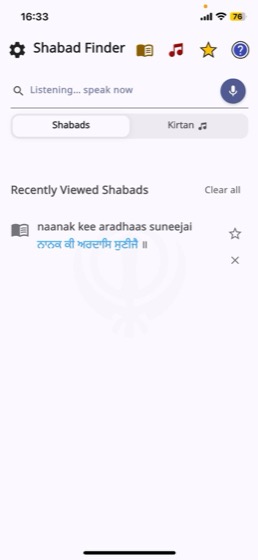
When typing gets in the way
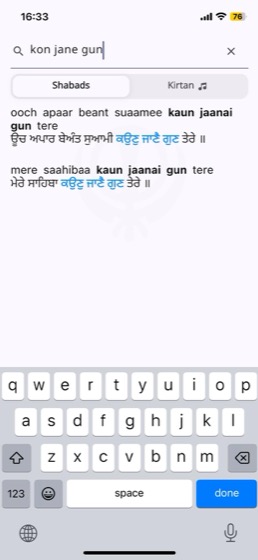
Writing Gurmukhi in English letters is guesswork. Is it kaun or kon? jaanai or jane? Speaking skips that problem entirely — you say it the way you have always heard it.
- No Gurmukhi keyboard, no transliteration guesswork
- Useful while driving, cooking, or holding a child
- Helpful if typing is difficult or the screen is hard to see
- Results appear the moment you stop speaking
The same results, a faster way in
Voice is simply another door into the same search. What you say is matched against Gurbani exactly as typed words would be, so you get the same lines, the same highlighting and the same full Shabads.
- Say two or three words — you do not need the whole line
- Tap a result to open the full Shabad with meanings
- Switch to the Kirtan tab to hear it sung
- Edit what was heard if a word came through wrong
About voice search
Is my voice recorded or stored?
No. Speech is converted to text by your phone's own speech recognition, and only the resulting text is used to search. Easy Shabad Finder does not record, store or upload audio. See our Privacy Policy for detail.
Which languages can I speak?
Say the Gurbani line as you would normally pronounce it. Recognition uses your device's speech engine, so accuracy depends on your phone's language settings and microphone.
What if it hears the wrong word?
The recognised text lands in the search box where you can edit it, or simply tap the microphone and try again.
Does voice search need internet?
Speech recognition and the search itself both need a connection.
Do I have to grant microphone permission?
Yes, your phone will ask the first time you tap the microphone. The rest of the app works normally if you decline — only voice search needs it.
Try saying a line you remember
Free on iPhone and Android.