 Easy Shabad Finder
Find a Shabad from any line you remember
You do not need the first line. You do not need Gurmukhi on your keyboard. Type two or three words the way they sound in English, and Easy Shabad Finder shows you every Gurbani line that matches.
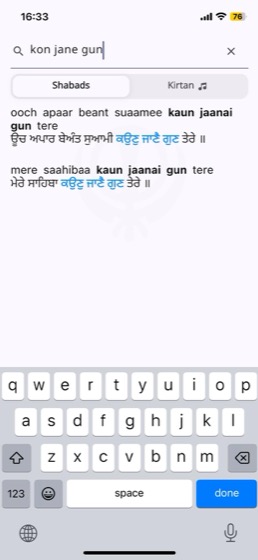
Search from the middle, not just the start
Most Shabad finders expect the opening line. But that is rarely what stays with you — usually it is a phrase from the middle that you have heard sung many times.
- Type kon jane gun and find ooch apaar beant suaamee kaun jaanai gun tere
- Matches appear as you type — no search button, no waiting
- Each result shows English transliteration with Gurmukhi beneath it
- Your matched words are highlighted so you can spot the right line at a glance
Spelling variations are expected, not punished
There is no single correct way to write Gurmukhi in English letters. Sahiba, saahibaa and sahibaa are all the same word, and the app treats them that way.
Search also folds the differences that trip up exact matching — extra spaces, invisible characters, and nukta spellings that vary between sources — so a line written one way in one place still matches what you typed.
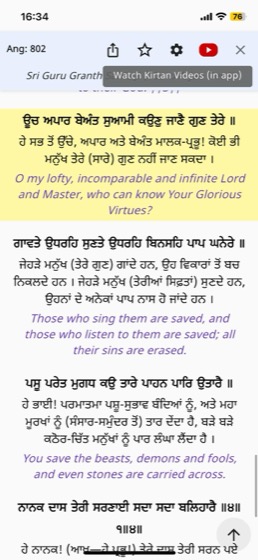
Open the full Shabad, with everything in context
Tap any result and the complete Shabad opens — with the writer, the source and the Ang shown at the top, so you always know where you are in Gurbani.
- Gurmukhi, Hindi, Urdu and English transliteration — turn each on or off
- Translations in Punjabi, Hindi and English, with a choice of author
- Jump straight to that Ang in the full Sri Guru Granth Sahib Ji reader
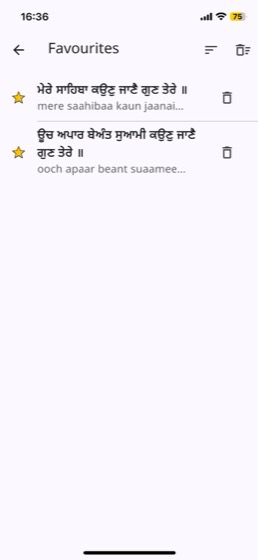
- Star a line to save it, or share a link that opens it on someone else's phone
Questions about search
Do I need a Gurmukhi keyboard?
No. You type in ordinary English letters and the app matches them against Gurmukhi for you. A Gurmukhi keyboard is never required.
How many words should I type?
Two or three is usually enough. More words narrow the results; fewer give you a wider list to scan.
Can I search in Gurmukhi directly?
Yes — if you have a Gurmukhi keyboard you can type Gurmukhi and it will match. English transliteration simply means you do not have to.
Can I find Kirtan for the Shabad I searched?
Yes. Switch to the Kirtan tab on any search and you will see recordings of that Shabad. More about Kirtan videos →
Try it with a line you remember
Free on iPhone and Android.